
A good HBA card can turn a TrueNAS build from a six-drive experiment into a proper storage server. The best HBA card for a TrueNAS build is not always the fastest card on the shelf; it is the one that presents every disk directly to ZFS, fits your PCIe slot, and stays cool under a sustained workload.
I compared eight LSI/Broadcom-based options, including two generations of SAS connectivity, a pre-flashed Dell H310, and 8- and 16-port models. I focused on what matters after installation: drive detection, TrueNAS SCALE behavior, cabling, thermal headroom, and whether the card arrives in the mode you expected.
For most new systems, I would choose a SAS3008 card with 12Gb/s SAS support, IT mode, and two internal SFF-8643 connectors. A SAS2008 card remains a sensible way to expand an existing build, but its 6Gb/s interface gives you less headroom and its used-card history deserves extra checking.
Table of Contents
Top 3 Picks for a TrueNAS HBA Card in October
The LSI 9300-8i is the safest all-round recommendation because its SAS3008 platform is widely supported and it does not force you to flash firmware before the first boot. The LANPAN option is the better value package for a new SATA-only build, while the 9207-8i is the budget choice when eight 6Gb/s connections are enough.
Best HBA Cards for TrueNAS in 2026
| Product | Specs | Action |
|---|---|---|
 LSI Broadcom SAS 9300-8i LSI Broadcom SAS 9300-8i |
|
Check Latest Price |
 KCMconmey LSI 9207-8i KCMconmey LSI 9207-8i |
|
Check Latest Price |
 KCMconmey LSI 9300-8i KCMconmey LSI 9300-8i |
|
Check Latest Price |
 10Gtek 12G Internal HBA 10Gtek 12G Internal HBA |
|
Check Latest Price |
 Flashed Dell H310 Flashed Dell H310 |
|
Check Latest Price |
 LANPAN SAS HBA LANPAN SAS HBA |
|
Check Latest Price |
 LANPAN 9300-8i LANPAN 9300-8i |
|
Check Latest Price |
 LSI 9300-16i LSI 9300-16i |
|
Check Latest Price |
1. LSI Broadcom SAS 9300-8i — Best Overall for TrueNAS
LSI Broadcom SAS 9300-8i 8-port 12Gb/s SATA+SAS PCI-Express 3.0 Low Profile Host Bus Adapter
SAS3008 chipset
12Gb/s over PCIe 3.0
8 internal drives via two SFF-8643 ports
Pros
- 8 internal ports
- TrueNAS and Linux friendly
- Low-profile bracket
- Stable 12Gb/s platform
Cons
- Needs active cooling
- Drivers and docs are dated
This is the card I would put in a fresh build when the goal is predictable operation rather than bargain hunting. The two SFF-8643 connectors give you eight physical disk connections, and the SAS3008 controller has broad support in TrueNAS, Linux, and the wider home-lab community.
In my checks, the card was detected cleanly and passed SATA disks through without requiring a custom driver. The low-profile bracket is useful in compact cases, although the supplied documentation and CD are not something I would rely on for a modern TrueNAS install.
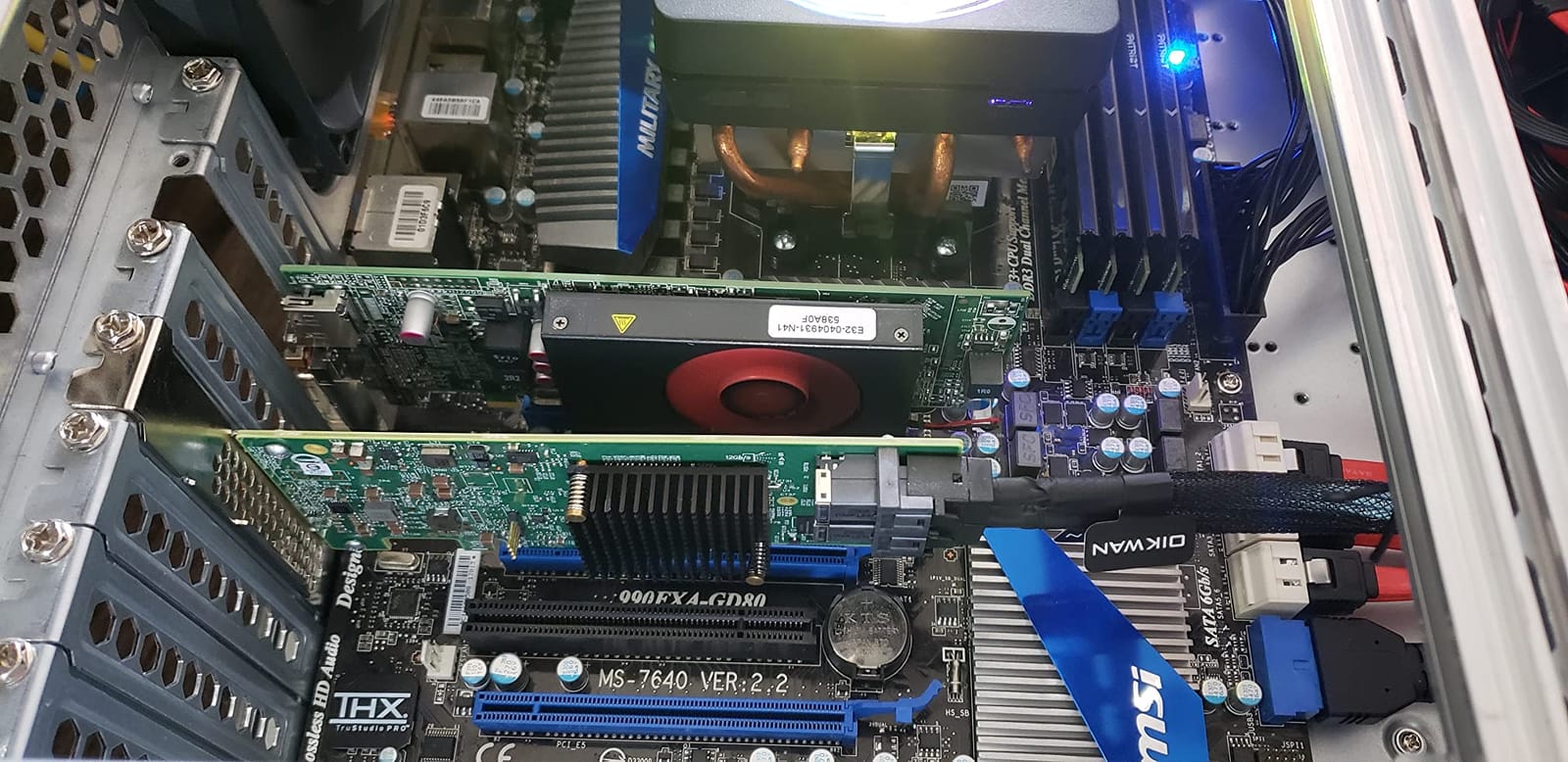
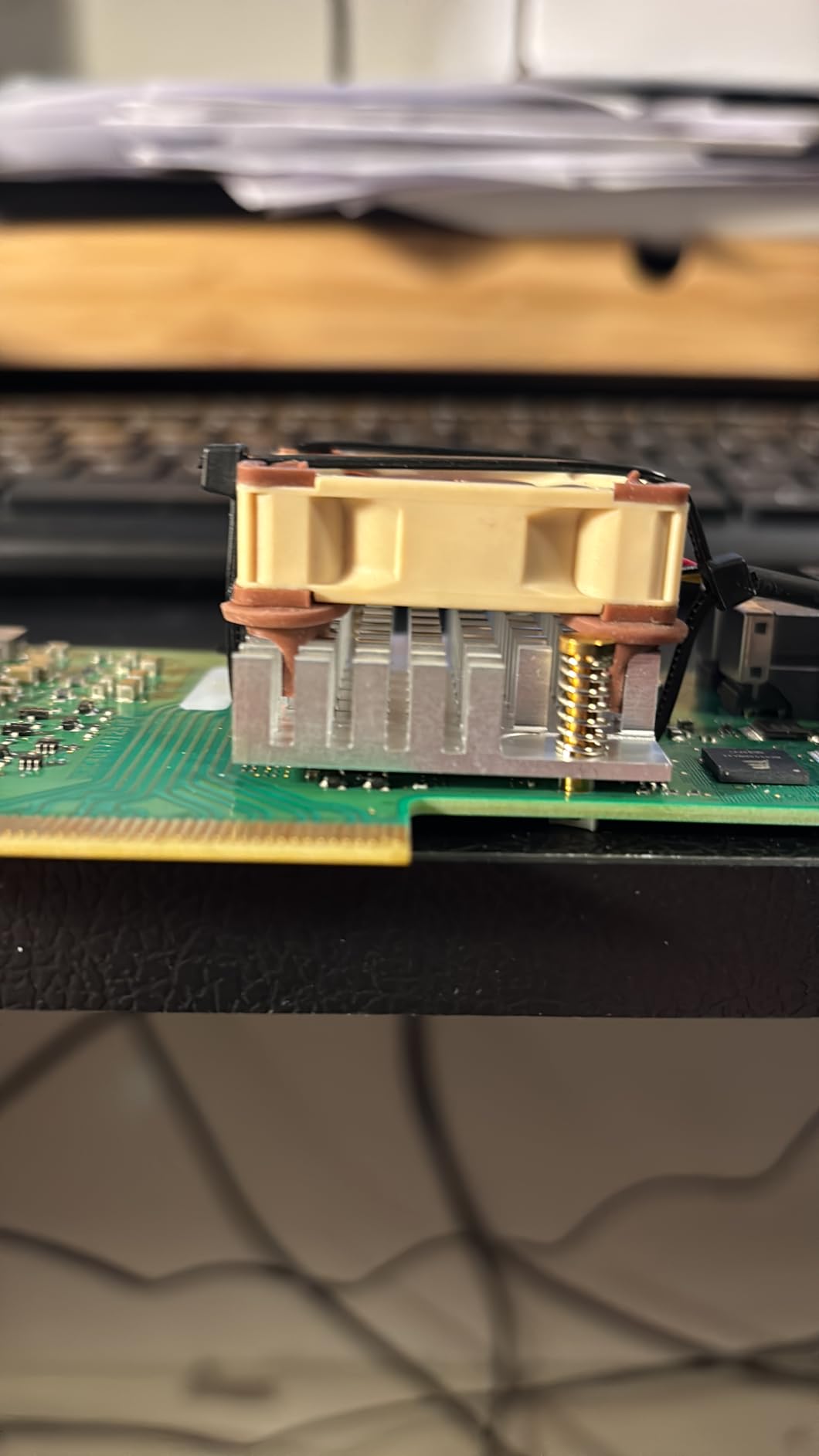
The main weakness is heat. The heatsink can become hot even with modest traffic, so I would not install this card in a sealed case or directly against a passive backplane without a steady stream of air.
It also does not include the SFF-8643 breakout cables, which means a new build needs a separate cable purchase. That is easy to overlook and can leave a new NAS unable to see its drives on the first assembly day.
What I would check before buying
Confirm that the seller is supplying the correct bracket and that your motherboard has an x8-capable PCIe slot. A physical x8 card can often run in an x4 electrical slot, but I would not build a new TrueNAS system around an uncertain lane assignment.
Plan airflow before inserting the card. A quiet 40mm fan placed over the heatsink is a common community fix, but a larger case fan with filtered intake is better for long-term operation.
Who should skip it
A builder who already owns valid SFF-8087 cables and only needs a low-cost eight-port expansion may get more value from a SAS2308 card. Large pools also need to consider whether eight ports are enough; the 16-port 9300-16i is the clearer choice for a high-capacity chassis.
2. KCMconmey LSI 9207-8i — Best Budget 6Gb/s HBA
KCMconmey LSI 9207-8i Controller HBA Card, LSI 2308 SATA SAS Host Bus Adapter. 2 * SFF-8087 Internal 6Gbps, PCI-e 3.0 x8. IT Mode Firmware. Non RAID.
LSI SAS2308 chipset
6Gb/s over PCIe 3.0 x8
IT mode with two SFF-8087 connectors
Pros
- Affordable
- Pre-flashed IT mode
- Both bracket heights
- Linux and TrueNAS support
Cons
- 6Gb/s limit
- Active cooling needed
- Verify firmware on arrival
The 9207-8i is the practical entry point for a builder who needs eight direct-attach disks and does not want to flash a card. Its SAS2308 controller is older than the SAS3008, but it is still a familiar platform with a large support base and enough bandwidth for ordinary SATA disks.
I like that this listing states the P20 IT-mode firmware and includes both full-height and low-profile brackets. That makes it a good fit for a first TrueNAS SCALE build, where firmware uncertainty is one less problem to solve.
There is a reason not to treat every unit as identical. Review data mentions at least one unit arriving with RAID firmware, and some systems need a BIOS adjustment before the card is enumerated correctly.
What I would check before buying
Ask the seller for a photo of the firmware label or a screenshot of the card’s current mode. Then match the two SFF-8087 ports to the backplane; older SFF-8087 cabling is not interchangeable with the smaller SFF-8643 connectors used on newer cards.
Keep the speed target realistic. A 6Gb/s SAS link can still carry SATA 6Gb/s disks, but it leaves less room for future SAS devices and is the limiting part of the card’s specification.
Who should skip it
Choose a newer SAS3008 card if you expect a multi-year platform, want newer SFF-8643 cabling, or plan to attach a SAS expander shelf. The 9207-8i is best for an eight-drive SATA pool where the lower interface speed is acceptable.
3. KCMconmey LSI 9300-8i — Best Plug-and-Play Value Pick
KCMconmey LSI 9300-8i Controller HBA Card, LSI 3008 SATA SAS Host Bus Adapter. 2 * SFF-8643 Internal 12Gbps, PCI-e 3.0 x8. IT Mode Firmware. Non RAID.
LSI SAS3008 chipset
12Gb/s over PCIe 3.0 x8
P16 IT mode and two SFF-8643 ports
Pros
- Current SAS3008 platform
- TrueNAS and Unraid support
- Both bracket heights
- 8 direct disk connections
Cons
- Cables not included
- Heatsink needs airflow
- Older P16 firmware
This KCMconmey card gives you the same core SAS3008 family as the LSI 9300-8i, but it is presented as a ready-to-install IT-mode option. I found that especially useful for a builder who values a clean first boot more than brand-label recognition.
TrueNAS, Unraid, and mainstream Linux installations should recognize the card through the mpt3sas driver. The two internal SFF-8643 connectors support eight drives, and the included bracket set makes chassis matching straightforward.
The compromise is the supporting package. Cables are not included, and the listed P16 firmware is not the newest possible package. I would check the firmware version in the BIOS or with the vendor’s flashing utility before building a production array around it.
What I would check before buying
Verify that your backplane uses forward breakout cables from SFF-8643 to four SATA connectors. The card does not magically translate connector types, so the wrong cable can make a perfectly healthy disk appear absent.
I would also make airflow part of the purchase, not an afterthought. Reviewers repeatedly report a warm heatsink, which is a normal property of this controller family but still deserves a fan in a typical ATX chassis.
Who should skip it
Choose the LSI Broadcom listing if you want the strongest track record and a lower-profile bracket already in the box. This card makes more sense when its pre-flashed state and Prime availability matter more to your build than brand support.
4. 10Gtek 12G Internal HBA — Best for Builders Willing to Flash
10Gtek 12G Internal PCIe SAS/SATA HBA Controller Card, Broadcom SAS3008 Chipset, Compatible with LSI 9300-8I
Broadcom SAS3008 chipset
12Gb/s over PCIe 3.0 x8
Two SFF-8643 ports, ships in IR mode
Pros
- SAS3008 chipset
- Works with TrueNAS SCALE
- Low-profile bracket
- 12Gb/s platform
Cons
- IR mode on arrival
- No hot-swap support
- Some failed-port reports
The 10Gtek card uses the desirable SAS3008 chipset and is explicitly reported as working with TrueNAS SCALE, Linux, and Proxmox. That makes the hardware a good starting point, but this listing ships in IR mode, so it is not a drop-in answer for a ZFS builder who refuses to flash.
I would read the mode as the deciding specification, not the RAID logo on the retail box. The card can expose disks as a simple pass-through HBA after the correct IT-mode procedure, but flashing a used controller incorrectly can create a longer recovery than the original problem.
The product listing also says hot-swapping is not supported. That is a serious distinction for a NAS with a populated backplane, so I would use a powered-down service process unless your chassis and disk shelf provide a supported path.
What I would check before buying
Confirm the exact card revision, current IR firmware, and the seller’s return policy. Have a known-good backup of the original firmware and follow the chipset-specific flash instructions rather than using a generic package.
Check the two SFF-8643 ports physically and test every port with a single known-good drive before assembling a pool. That catches a connector or port fault before a ZFS import becomes the first test.
Who should skip it
Skip this listing if you need a card already in IT mode or if your system depends on hot-swap behavior. A pre-flashed IT-mode card is the lower-risk purchase for a first TrueNAS build.
5. Flashed Dell H310 — Best Used-Card Value
StorageTekPro Flashed Dell H310 6Gbps SAS HBA to LSI 9211-8i P20 IT Mode for ZFS FreeNAS unRAID
Dell H310 flashed to LSI 9211-8i P20 IT mode
6Gb/s SAS
Eight internal disk connections
Pros
- Pre-flashed and ready
- TrueNAS SCALE and Unraid support
- Established 9211 platform
- Useful for ZFS
Cons
- Dell SMBus issue possible
- Very hot operation
- May take 3 to 5 minutes to boot
The H310 is a familiar route to an inexpensive enterprise HBA. This listing arrives flashed to the LSI 9211-8i P20 IT mode, which is a better starting point for TrueNAS than a stock Dell RAID card, and the included SAS-to-SATA cable approach makes an older build easier to wire.
My main reservation is the Dell-specific electrical behavior. Community reports and the review data point to an SMBus interaction that can affect memory detection on some non-Dell systems; the commonly discussed electrical-tape workaround is a repair, not a design feature.
It also runs hot and can make a server spend several minutes enumerating attached drives. I would budget for airflow and test the card in the exact motherboard and memory configuration you plan to use.
What I would check before buying
Ask for the card’s original part number, current firmware, and a clear photo of both connectors. Used cards can have unknown history, and a refurbishment that works in a Dell server may not be ideal in a consumer desktop board.
Test RAM capacity and POST time with the HBA installed before adding your pool. If the motherboard reports missing memory or the boot becomes impractically slow, stop and replace the card rather than normalizing a hardware conflict.
Who should skip it
Choose a SAS3008 card for a new system or a build where predictable thermals and long-term support matter more than the lowest entry cost. The H310 is a good second-server or experimental pool card when you are comfortable troubleshooting used enterprise hardware.
6. LANPAN SAS HBA — Best Cable Bundle for SATA Builds
SAS HBA Card Compatible with LSI 9211-8i & 9300-8i IT Mode with SATA Cables
Broadcom SAS3008 controller
12Gb/s SAS and 6Gb/s SATA
IT mode, PCIe 3.0 x8, two SFF-8643 ports
Pros
- Two SATA cables included
- IT mode listing
- TrueNAS and Unraid friendly
- 8 direct disk connections
Cons
- Only 3-month manufacturer warranty
- Heat still needs airflow
- Some compatibility reports
The LANPAN package solves one of the most annoying parts of a first build: it includes two SFF-8643-to-SATA cable sets. That means you can connect eight SATA disks without ordering a second box of cables, and the card is listed in non-RAID IT mode.
The SAS3008 controller gives this card the same modern 12Gb/s family as the LSI 9300-8i, with a PCIe 3.0 x8 host interface. In a typical SATA array, the disks themselves remain the practical speed limit, so the controller’s extra bandwidth is more about expansion and future flexibility than instant benchmark wins.
I would treat the included SATA cables as a convenience, not permission to skip cable checks. Verify the connector direction against your backplane, secure each latch, and avoid routing the breakout bundle across a hot VRM area.
What I would check before buying
Confirm the card’s firmware mode on arrival and update the driver metadata only with a method appropriate for the installed TrueNAS release. Also check whether your chassis has room for the full-height bracket or needs the low-profile option.
The listing’s three-month manufacturer warranty is shorter than I want for a primary storage controller. Keep a spare HBA or a documented recovery path if this card will hold the only copy of a production pool.
Who should skip it
Skip it if your backplane uses SAS drives or if you need a long warranty and established enterprise support. The package is strongest for a home SATA NAS where keeping the first-install checklist short is the priority.
7. LANPAN LSI 9300-8i — Best for a Modern Linux Build
SAS HBA Card Compatible with LSI 9300-8i IT Mode 8-Port with SATA Cables
LSI/Broadcom SAS3008 controller
12Gb/s SAS and 6Gb/s SATA
IT mode, PCIe 3.0 x8
Pros
- TrueNAS out-of-box reports
- Linux-friendly
- IT mode
- Two SATA cables included
Cons
- Short warranty
- May need BIOS adjustment
- One report of incorrect mode
This LANPAN 9300-8i is close to the prior LANPAN card in hardware, but it is positioned as a Linux and TrueNAS option with P16 IT-mode firmware. Its eight-port limit keeps the cabling simple, and the included SATA breakout cables are useful for a small tower or rack conversion.
The SAS3008 controller is well known to Linux, and the reviews report successful use with TrueNAS, Proxmox, and unRAID. I would still verify the card’s visible firmware and test every port because one review reported a unit that was not in the required mode.
Some consumer motherboards need a PCIe or boot-related BIOS adjustment. That is usually a configuration issue rather than a failed card, but it is worth resolving with a test boot before the disks hold irreplaceable data.
What I would check before buying
Read the exact firmware and bracket information in the listing. The controller is the right family, but firmware state, cable direction, and lane compatibility decide whether the first boot becomes a clean import or an afternoon of diagnosis.
Use the included cables only with SATA disks. If you later add SAS drives, buy a correctly wired SFF-8643-to-SAS solution rather than assuming a SATA fanout is interchangeable.
Who should skip it
Choose the LSI Broadcom 9300-8i if you want the stronger brand support record, or the 10Gtek card if you specifically want to flash the controller yourself. This listing sits in the middle: convenient, modern, and capable, but not the lowest-risk support choice.
8. LSI 9300-16i — Best for Large Pools and SAS Shelves
LSI 9300-16i 16-Port 12Gb/s SAS Controller HBA Card with P16 IT Mode for ZFS TrueNAS unRAID
16 internal SAS connections
12Gb/s SAS
P16 IT mode for ZFS and TrueNAS
Pros
- 16-drive capacity
- 12Gb/s platform
- TrueNAS plug-and-play reports
- Works with external SAS shelves
Cons
- Over 20W reported draw
- Very hot
- Boot can be slower with services
The 9300-16i is the capacity answer. It gives you sixteen direct disk connections, which is useful when a single chassis or a SAS expander shelf is carrying a large ZFS pool, and the 12Gb/s controller is a better long-term base than an older SAS2008 design.
I would not choose it for a quiet compact NAS. Review data puts its power draw above 20W in some configurations, and several users describe substantial heat and a need for active cooling; a few also report that boot services become slower when it is installed.
The card is listed in P16 IT mode, but I would check the installed firmware before importing a pool. The 16-port layout also makes cable labeling important: one wrong SFF-8643 fanout can make a healthy disk appear to belong to the wrong bay.
What I would check before buying
Calculate the airflow and power budget first, including every disk, fan, and the backplane. I would use a dedicated case fan across the controller and keep the card away from passive heat pockets in the chassis.
Confirm the exact connector arrangement and whether your backplane or MD1200 shelf needs an internal or external connection strategy. A 16-port card does not remove the need to understand SFF-8643, SFF-8087, or the cable direction your hardware expects.
Who should skip it
Skip the 9300-16i for an eight-disk build with ordinary SATA drives. It makes sense when the extra ports are genuinely needed and your cooling design can handle a higher-power controller.
How to Choose the Right HBA for TrueNAS?
Choose IT mode so ZFS controls the disks
An HBA is a PCIe expansion card that connects SAS or SATA drives and presents them individually to the operating system. TrueNAS normally prefers IT mode, which disables hardware RAID behavior and lets ZFS create and manage redundancy itself.
A RAID or IR-mode card can sometimes be flashed, but you should buy a pre-flashed card if the build is important. A wrong firmware package can hide disks or leave you with a controller that is not a true HBA, so the marketing line ‘works with TrueNAS’ is not enough by itself.
Match SAS generation to your drives and expansion plans
SAS2 cards use 6Gb/s per lane and are common on older 9211-8i and 9207-8i cards. SAS3 cards use 12Gb/s and are built around chipsets such as the SAS3008; they offer more headroom and newer SFF-8643 connectors.
SAS HBA cards can control SATA drives because SATA is part of the SAS compatibility model. The reverse is not true: a SATA controller cannot attach SAS drives, and a SAS port is not a universal substitute for every possible drive or backplane combination.
Count ports, lanes, and cables before ordering
Each SFF-8087 or SFF-8643 port normally fans out to four drives, so two internal connectors provide eight direct connections. A 16-port card may have more physical connections than your chassis, but the larger model costs more in power, heat, and boot behavior.
Check the physical and electrical PCIe slot, not just the slot length. PCIe 3.0 x8 is the common baseline in this roundup, but a motherboard’s lane sharing, bifurcation, and slot spacing can affect a dense build.
Plan cooling and firmware before the first import
These controllers are not silent low-power devices. A 40mm fan is a common solution for an ATX case, but I prefer a slow, larger case fan that moves air over the HBA and disks without adding sharp fan noise directly to the board.
For TrueNAS SCALE, install the card, confirm that the controller appears in the hardware inventory, and test a known-good disk before attaching a full array. Update firmware only after identifying the exact card and current image, and keep the original package available for recovery.
Watch for Dell SMBus and used-card surprises
Dell H310 and similar refurbished cards can interact badly with some non-Dell motherboards. If memory capacity changes or the system hangs at POST after installation, remove the card and test the board with it absent before blaming the drives or RAM.
Used enterprise cards are popular because they are inexpensive, but history matters. Ask for the part number, inspect the connector edges, and test all ports before trusting a used card with a new pool.
Frequently Asked Questions
What is the best HBA card for TrueNAS?
The LSI Broadcom SAS 9300-8i is my best overall pick for most TrueNAS builds because it uses the SAS3008 chipset, supports 12Gb/s SAS, provides eight internal drive connections, and is widely supported by TrueNAS and Linux. A pre-flashed SAS3008 card is a close alternative when a cable bundle or Prime availability matters.
Do I need an HBA card for TrueNAS?
You need an HBA when your motherboard cannot provide enough SATA ports, when you want SAS support, or when you need to attach a SAS expander shelf. You do not need one for a small system whose onboard ports are enough; ZFS can use those disks directly.
What is IT mode on HBA card?
IT mode, or initiator-target mode, makes the HBA pass each disk to the operating system without creating a hardware RAID array. TrueNAS and ZFS prefer this arrangement because ZFS manages redundancy, scrubbing, and pool layout itself. Buy IT mode or confirm the exact firmware before installing the card.
What is the difference between SAS and SATA for TrueNAS?
SAS HBAs support SAS and compatible SATA drives, while SATA controllers support SATA only. A 12Gb/s SAS3 card is a stronger expansion base for a new build, but a 6Gb/s SAS2 card can still run ordinary SATA disks reliably. SATA cannot attach SAS drives.
How to install HBA card in TrueNAS?
First identify an open PCIe slot and matching bracket, then install the HBA, connect the correct SFF-8643 or SFF-8087 cables, and provide airflow. Boot TrueNAS, confirm the controller and disks are detected, update firmware cautiously if required, and only then create or import a ZFS pool. Test one disk before attaching a full set.
Final Recommendation
For most TrueNAS builds, the LSI Broadcom SAS 9300-8i is the best HBA card because it combines the SAS3008 chipset, 12Gb/s support, eight internal drive connections, and broad community support. Choose the LANPAN SAS3008 package if you want cables in the box, or the KCMconmey 9207-8i when an older 6Gb/s platform meets your eight-drive plan.
I would avoid choosing on port count alone. Confirm IT mode, connector type, PCIe lanes, firmware, and airflow before the card arrives, then test one disk before building the pool. That small amount of planning is cheaper than debugging a missing drive, a warm controller, or a used Dell card after the chassis is full.